All posts by DH

Saving dhnexus …

During the interim period of March 2025 to March 2026, when I was unable to get into dhnexus.com,  the All in One Migration plugin that had served me so well for many years became out of reach for me. Result of which I was unable to restore my backup easily.  I had to create a new Website from scratch.

The original owner/s of the All in One plugin must have sold it to a business who was out to make big bucks, which some users may be OK with, but I just cannot afford.   $69 for one year only for a single plugin is a bit over the top I think.  You can check the charge at the link below:

https://servmask.com/products/unlimited-extension

So when I realized what was happening, I changed  all of my WordPress Websites to the Duplicator backup and migration plugin.  However of course because my dhnexus.com Website was blocked, I could not back up my dhnexus Website with Duplicator.  Once I realized that my VPS for dhnexus had been terminated, I had to puzzle a way to save my dhnexus.com from the All in One plugin backup, without the use of the plugin.  How I managed to do this was to find a way to unpack the All in One Migration backup file so I could extract the database.sql file.  I imported the database into a temporary database and in the phpmyadmin app I was able to extract and copy the pages and posts.  It took a bit of effort to set it up, but at least dhnexus is up and running again.

Oops! InstaFree terminated my VPS …

I discovered my guilt in baby steps after my return from a trip to Africa.  First I was dumbfounded when it happened after my arrival in Johannesburg.  When I tried to update my Website, my access to the VPS was completely blocked.  I didn’t have access to the InstaFree Forum either, and was unable to contact the Admin or anyone at InstaFree.  A VPN also didn’t work.

So after my return in March 2026, when I was able to check in at the Forum, I learned, as to be expected after a long time of absence from my VPS, my VPS had been terminated.  Initially I thought I couldn’t have been aware of the country blocking, but after studying the original application, I noticed that when one signs up for a VPS hosting account, it immediately comes up with a country block warning from InstaFree.  So when I originally applied in March 2024, I must have ignored the content of the blocked list and assumed the list would contain the usual ones that have been banned by US legislation.  So when I finally checked the list I noticed a much more elaborate and detailed list in which the whole of Africa had been blocked.  I should have been more careful when I signed up for the VPS.  So this is my fault entirely.

Regardless, there were so many good things that came from having the VPS and participating in the discussion Forum. InstaFree provided me with a VPS account that was of very high quality.  The VPS came with an IPv6 instead of the easy IPV4.  So I was provided with a challenge and opportunity for learning for the first time how to use an IPv6 to set up a VPS.  And also how to create a working WordPress site on a VPS that works with an IPv6. I discovered through this learning experience  that WordPress is not as on the level as it should be with IPv6. I was unable to automatically update my plugins. It will be interesting when one day I have an opportunity again to work with an IPv6 on a VPS, to check whether WordPress has finally caught up with IPv6 times.

Here is a list of InstaFree’s forbidden countries:

https://www.instafree.com/forbidden_countries.php

AFGANISTAN AFRICA – CONTINENT ALBANIA
ALGERIA ARGENTINA BANGLADESH
BELARUS BRAZIL CHINA
COLOMBIA EGYPT INDIA
INDONESIA IRAN IRAQ
ITALY IVORY COAST KOSOVO
KUWAIT LIBYA MALAYSIA
MOROCCO MYANMAR NIGERIA
OMAN PAKISTAN PHILIPPINES
POLAND PORTUGAL ROMANIA
RUSSIA SAUDI ARABIA SERBIA
SINGAPORE SOMALIA SPAIN
SRI LANKA SUDAN SYRIA
TAIWAN THAILAND TUNISIA
TURKEY UKRAINE UZBEKISTAN
VENEZUELA VIETNAM YEMEN

From Mexico – and still going strong!

Totally impressed.  I’m writing this blog post from a very hot city in Mexico.  At a Starbucks with a very nice buzz and great coffee.  Checking up on my blogs.

Thank you to Bryan and his team at Instafree.com for the continued excellent service.

Looks like WordPress still doesn’t have its act together for IP 6 service.  Guess it’s going to take some time for it to get up to date with the new century.


Update – still going strong!

So it’s been a while since I last posted and this morning was very happy to see that all is still well with my blog.  Thanks to the excellent VPS hosting  by  Instafree.

One thing for sure.  If anything would have happened in that I’d have been unable to access my blog,  I’d have had to study through all of my posts and notes as this blog is the first blog that I set up using IPv6.  The reason I joined Instafree and was generously provided with a free VPS, was the VPS works with IPv6 only.  IPv6 was totally new to me.  Up to March I had been spoilt with IPv4 only.  At the time I had wondered what progress would have been made, and whether it would be easier to use IPv6.  And then found that the free hosting community was still very much IPv6 resistant.  Yes, much progress has been made, but when I searched for a free panel script, I couldn’t find a single one that worked with IPv6.  I had to set up the VPS from scratch.

Furthermore, in spite of fixing the DNS of my domain at Namecheap to be used with an IPv6, that didn’t work. So Namecheap DNS for IPv6 is also not with it yet.  In the end Cloudflare came up as a champion for IPv6 DNS and I finally was able to set my VPS WP blog up. It took some struggles to arrive at Cloudflare as my very last option, but for the first time since Cloudflare has been around, I feel that they actually rescued me from giving up on being able to use IPv6.  Success at last!

A further shortcoming with IPv6 however soon made its appearance in that WordPress is not set up to work with IPv6 yet.  That was a bit shocking to me, particularly since WordPress didn’t mention this in its Dashboard, when I was having serious issues with uploading plugins directly.  It kept on coming up with notifications in the Dashboard providing a few reasons (all of those on the user side of course) why there was an issue.  I had to research and dig deep in the WordPress support posts to discover that the issue was with WordPress and not IPv6 users.  WordPress is still not set up to work with IPv6.  They expect the user to set up their IPv6 to have the appearance of IPv4 so it can work seamlessly with the WordPress Website.  I was not prepared to do that as what was the point.  We’re supposed to be able to work with IPv6 as IPv6.  If Cloudflare can do that as well as a few other Websites, why not WordPress?

So let’s see what has happened since March, and whether we are able to update our blog easily, or will have to update the plugins manually.

MariaDB almost an oops!

Last night dhnexus.com was down, first time this has happened so far.  It said it could not connect with the database.  So of course I immediately thought it was because of IPv6.  And then started to research solutions to the problem.

Fortunately it happened late in the evening, and I thought to postpone any action after proper research today.  Good I did that as when I checked this afternoon the Website was up and running fast and furiously as it always did.

So following last night’s preliminary research, it must have been the database server that had been down.  As everything else was working OK.  Apache was up and running.  I tried to fiddle a little with the wp config file, but this did not help, so decided to delay any more action for today.  Thank goodness I did that, as in all probability if I had continued, it would have grown into an all nighter all for nought.

During my research I picked up on a few suggestions for checking the MariaDB database which I would have worked on if the Website had still been down this afternoon.

Here are some common commands for managing MariaDB under systemd:

systemctl status mariadb

systemctl start mariadb

systemctl restart mariadb

systemctl stop mariadb

systemctl reload mariadb

If you want to check on the database:

mysql -u username -p
Password: dbase password

Here is a URL of an excellent tutorial of how to install and manage MariaDB on Debian 10:

https://www.tecmint.com/install-mariadb-database-in-debian-10/

Send in Cloudflare!

I have just managed successfully to set up a free VPS with an IPv6.  The challenge was to set up IPv6 as I had never done something like that before.  I have been spoilt to always have an IPv4. I doubt I’d have been able to get my IPv6 to work without the assistance of Cloudflare.

It took hours of research and at least a few re-installations of my OS  to discover that IPv6 is still not 100% accepted every where.  There are no free control panels available for a VPS with IPv6.  Some of the free control panels maintain they do support IPv6, but when I tried them out I could not use their scripts. The scripts either asked for an IPv4, when I input an IPv6, or the script would just bog down when I tried to install it.

I then decided to use LAMP with WordPress as a Plan B, which in hindsight is a much better option for a small VPS.  However, during my first attempt at installation of Apache 2,  Apache2 would not show up either in localhost or the domain.  I was ready to concede defeat when out of the blue I thought of Cloudflare, begrudgingly.   My dislike of Cloudflare had started many years ago in 2013, when the owner of the discussion forum I was staff at, decided to try out Cloudflare for extra security for the discussion forum.  I was totally disgusted when Cloudflare would not allow me to log in, as at the time I was from the UAE.  Quite a number of us at the Forum got similarly axed by Cloudflare.  The owner then immediately removed Cloudflare, but the experience stayed with me for a very long time.

March on to 2024, and Cloudflare baled me out with getting my IPv6 to propagate through the network.  All I had to do was re-open my account at Cloudflare, reregister my two name servers and add them to my domain at my domain registrar.  I also registered an AAAA DNS record for the IPv6 at Cloudflare.  There was absolutely no delay, the propagation of DNS was immediate.  When I created Apache2 with Debian 10 this time round, Apache did not show up in localhost, but it did show up with the domain.

Unfortunately Cloudflare cannot compensate for WordPress being unwilling to support IPv6, so when I tried to install WordPress after LAMP in the terminal, Debian could not access  wordpress.org to download the script.  I had to do the installation of WordPress with FileZilla in the end.  Installation of WordPress was effortless, however since I am unable to get to wordpress.org because of WordPress.org’s inability to support IPv6, I am unable to download and update plugins automatically.  After the discovery of WordPress.org’s cowardly inability to support IPv6, I decided that automatic updates and installation are overrated.  I will take care of these manually instead.  The rest is working like a charm.  With unbelievable speed and seamless operation.

Thank you Cloudflare!  I don’t think I’d have been able to do this without your help.  I even went ahead to install the Cloudflare plugin.  Hopefully it will provide extra security and fast and flawless operation as it promises to do.

For those in similar circs who are trying to get their IPv6 to work, here is a great tutorial from Hostinger, of how to sign up with Cloudflare and install Cloudflare DNS:

https://www.hostinger.com/tutorials/how-to-setup-cloudflare-for-wordpress

VestaCP may be back again!

So this was wonderful news.  While I was setting up my InstaFree VPS I visited VestaCP Forum to see how they were doing, and noticed most of the old Admin were back. Their names appeared against a number of current postings.  Looks like VestaCP has decided to redevelop its script with effect of February 2024.

We are happy to announce that Vesta is back under active development as of 25 February 2024. We are working on v1 candidate and expect to engage more with the community over the coming months. We are committed to open source, and we encourage contributors to help us build the future of Vesta.

I also noticed the names of Admin against recent posts that have developed forks of the VestaCP script including the authors of HestiaPanel.  I’ve been using MyVestaCP  for a good number of years since VestaCP.  Regrettably it became neglected around 2020 and it appeared as though the script was no longer being updated.  This created a very big upheaval among many VestaCP users who had experienced hackings and some of the Web hosts refused to allow the script on their servers.

I used the VestaCP script well beyond 2020, however when the VestaCP Forum became deathly quiet with only very occasional posts by the owner, I heard of the MyVestaCP fork, and changed from CentOS to Debian in order to use it.  The fork is for Debian only.  The developer of the fork maintains a number of servers using VestaCP, all of which are on Debian OS.  So it is in his interest to keep the script very secure with the result that the fork is being maintained to very high security standards.


Classic Widgets Plugin!

There are many things irritating me about WordPress these days most of which is its refusal to get with the times to support IPv6.  Perhaps that is symbolic of many other things that are happening like a growing script that is getting heavier by the day for little return in terms of improvements.

What boggled my mind most recently was WP’s new “block design” app for creating widgets.  I just couldn’t work with it. It was almost as though I would have to search for a tutorial to get the hang of it, when its previous classic widget setup had worked so well.  For me it felt like moving a few miles backwards.

I prefer to have something that is quick and effective with no time wasted.  And the old classic widget app had done just that.  If I wanted a list of posts in a widget, or an archive, I could just click on one and drag it to the widget space.

So after some search I was delighted to notice that similar to the Classic Editor plugin replacement, that I’ve been using for years since WordPress came out with its new iffy Guthenberg design tools, there is also a Classic Widgets plugin.  It was easy to download and upload to my WP site, and reminded me once again how easy it is to work with it. No lessons needed.

https://wordpress.org/plugins/classic-widgets/

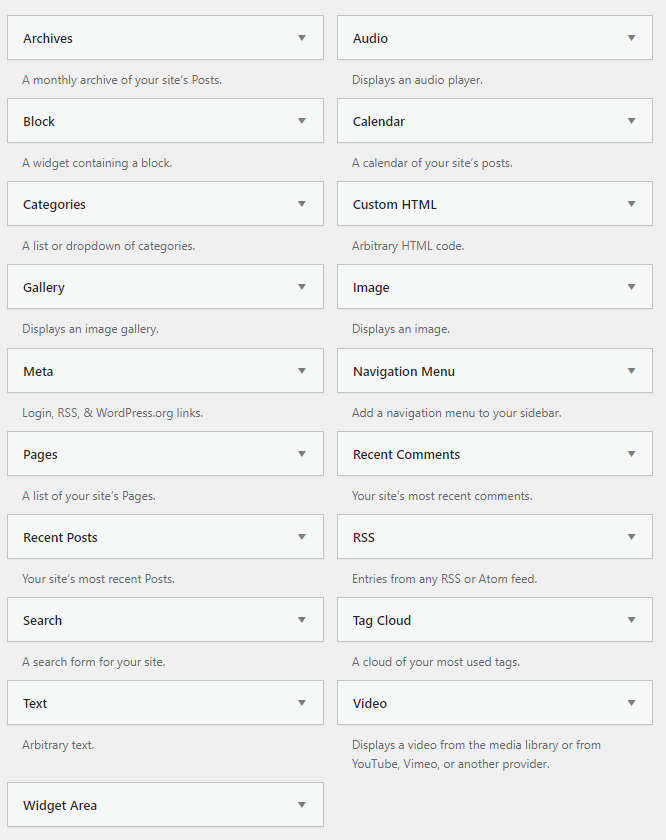
All one has to do is to click on “widgets” under appearance in the Dashboard, and there is a whole display of essential widget designs that one can choose from.

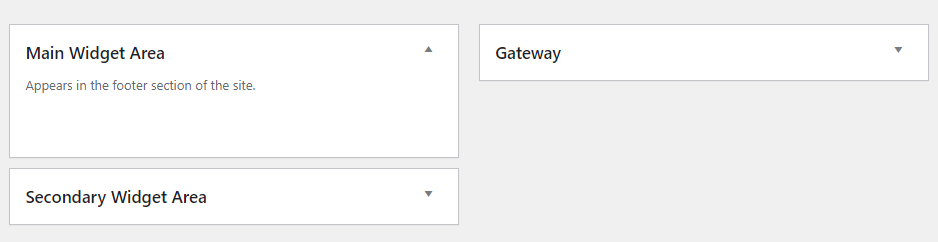
It also displays the widget areas of the WP site:

What’s easier than just to drag and drop the options that are available to the widget areas and Bob’s your Uncle!

WP lack of support for IPv6!

This has been really annoying.  Trying to discover why my VPS could not get through to wordpress.org.  During installation of the WP script on Debian 10, it was unable to fetch the script from wordpress.org as it could not access WP.  I then downloaded the script from wordpress.org separately, and uploaded it with FileZilla.  Everything worked exactly as it should except I was unable to install plugins or auto update them through the Dashboard.

I was at least able to manually upload my All in One Migration Extension Plugin from my backup, as well as the All in One Migration plugin from WordPress.org Website.  Then when I tried to import a backup WordPress Website, the All in One Migration plugin forced me to update the Extension Plugin.  Strangely enough after the update, the plugin changed into auto update.  I now have only one auto update plugin.  My Website is unable to reach wordpress.org, however is performing very well.

I must have spent hours and hours trying to figure out why my Debian 10 Buzzer cannot reach WordPress.org.  WordPress Dashboard had me believe that the problem was on my side. It offered a very long list of suggestions, including Debian permissions. I checked through them all. Finally I discovered an online discussion at WordPress that indicates that WordPress does not really support IPv6. WordPress expects the whole world to do a Nat64 so IPv6 can be IPv4 compatible.

https://meta.trac.wordpress.org/ticket/3090

Personally I’ve come to the conclusion auto plugins and auto installation are overrated. Everything else works excellent, seamless and fast.  And I  feel protected by Cloudflare. I installed the Cloudflare plugin in WP today, and the promise is that the Cloudflare plugin will provide for  faster and more secure operation of WordPress. So far my Website on the VPS with IPv6 has been performing seamlessly and blazingly fast!

For any one who is interested in setting up their IPv6 with Cloudflare I found a great tutorial at Hostinger:

https://www.hostinger.com/tutorials/how-to-setup-cloudflare-for-wordpress

VPS with IPv6 Challenge!

After post4vps stopped their post4vps service every now and then I would search the Web for a new similar service.  I missed the Forum discussions in particular where plenty of specialist knowledge had been exchanged and tutorials contributed on a wide range of topics.

This year – 2024 – I lucked out.  I landed at  InstaFree.com, a provider of both free and paid VPS, Reseller and Shared Hosting with cPanel.  Before I knew it I had signed up for joining the Discussion Forum and received a warm welcome from the Admin.  Didn’t take long for me to apply for a free VPS with IPv6.   I did this as a challenge to myself. During my post4vps days I could get a free VPS for 8GB RAM and 20 GB space, and IPv4 was easily available. No one worked with IPv6. So now I had the opportunity of figuringIPv6 Networking out.  Particularly to discover for myself if IPv6 had made any progress in the hosting industry during the last four years.

My first challenge with IPv6 was getting into my VPS. I am used to PuTTY and when I input the IPv6 number it wouldn’t budge. I then erroneously thought PuTTY doesn’t work with IPv6 and tried to use the VNC that was provided. I experimented with a couple of free VNC Viewers, and had an issue with copy and paste. The VNC also didn’t feel very stable. Long story short and a couple or more installations later I figured PuTTY out. All it needed were brackets around the IPv6 number.

Another great service from InstaFree is the VPS comes with a Virtualizor Panel. And it has the ability to reinstall the Linux Distribution from a number of current versions. When I requested the VPS I asked for Debian 11. But as I was marching along, it soon started to look like Debian 10 Buzzer was still a good version to go for. So reinstalled Debian 10.

My plan was to get a free panel for the VPS and then to install WordPress from the panel. My goto panel is MyVesta, a Debian Fork of Vesta Panel. I very soon discovered that both MyVesta and Vesta Panel do not support IPv6 as yet. After plenty of research I was unable to find any free panels that support IPv6. I tried out WEBUZO, a panel I had subscribed to far back in 2014, but also knew would be too heavy for a small VPS. When I tried to subscribe, even when it says it supports IPv6, it would not allow me to purchase a license without an IPv4. I also checked out VirtualMin, another free panel that says they support IPv6. Not sure whether it felt I did not have enough resources, but when I tried to install the script, it would not allow me to do so. I soon got the message that there wouldn’t be a free panel available for the VPS. I would have to install LAMP with WordPress instead. Which would also be a much better way for a small VPS.

So when I went for installation of both Nginx first then Apache2 next, the pages failed to show up in my localhost or domain. I then realized that the DNS of Namecheap, who had registered name servers for my domain with the IPV 6 address, was not working. Finally I thought of Cloudflare. After some research I discovered that Cloudflare does provide support for IPv6. It was dead easy to fetch Cloudflare name servers that I added to my domain at Namecheap. I also studied the Cloudflare Dashboard and noticed I could create an AAAA Record for my IPv6. This was also dead easy to accomplish. Next I went back with a fresh Debian 10 Buzzer install and installed Apache 2 first. When I checked localhost, there was no Apache page, and that really was discouraging. But then when I entered my domain name the Apache page showed up in record time. Cloudflare DNS was working in spades. Success!

Next, installing MariaDB was fairly easy, and I immediately created a database for my WordPress Website. However, WordPress installation did come with some major issues. Debian 10 could not recognize wordpress.org when I wanted to apt-get the wordpress script. I did all kinds of permission tweakings. But it would not budge. I then went for a Plan B and worked with FileZilla. First I had to set up the FileZilla SiteManager with SFTP and the IPv6. I intuitively used brackets around the IPv6, and that worked straight away. I then navigated to wordpress.org, downloaded their latest script, and extracted it on my computer. Following that I copied the contents only of the WordPress script and uploaded it via FileZilla to the html folder.

Next I used PuTTY to nano the wp-config.php file. Added the Database info for WordPress. Was absolutely delighted to find the install page for WordPress when I entered the domain name. All had worked as planned. Except, when I arrived at the WP Dashboard, I found that I was unable to install plugins or update them. How I worked my way around it was to install an All in One WP Migration Plugin Extension that I had on my files, and then to navigate to WordPress.org to fetch the main All in One WP Migration Plugin Zip Folder and uploaded that manually. I then tried to import an old WordPress Website Backup. In the middle of the import, it forced me to update the Plugin Extension, and helped me complete the update. Strangely enough that is the only Plugin that can be auto updated. Something during the import and update created an auto update out of it. All of the other plugins can only be updated manually.

What a wonderful experience it has been.  Mission accomplished.  Now I know how to use a domain with IPv6.  Thanks to InstaFree.

Next challenge is to figure out how to reach WordPress.org with an IPv6.